

The world of work has changed, and for many, the commute is now just a few steps from the bedroom. While convenient, creating a space that’s both a relaxing home and a productive office can be a challenge. This guide is for residents of The Galvin, showing you how to build the perfect work-from-home setup, no matter your floor plan.
With the right ergonomics, technology, and design, you can create a workspace that boosts both productivity and comfort, all supported by The Galvin’s unique amenities.
Key Takeaways
- Ergonomics is Non-Negotiable: Investing in a quality ergonomic chair and desk setup is crucial for long-term health and focus, preventing back pain and eye strain.
- Your Space, Optimized: Any apartment at The Galvin, from an efficient studio to a three-bedroom, can be transformed into a functional home office with smart design and organization.
- Leverage Community Amenities: Go beyond your apartment by using The Galvin’s professional amenities like The Sphere conference rooms and The Studio maker space to enhance your remote work life.
- Tech Makes the Difference: The right technology, from a second monitor to noise-canceling headphones, can significantly boost your productivity and make your workday smoother.
The Foundation: Ergonomics for a Healthy and Productive Work Day
Your comfort directly impacts your focus. Aches and pains are distractions you don’t need. Building an ergonomic foundation is the first step to a successful WFH routine, helping you avoid burnout and stay healthy long-term.
The Best WFH Desk
Your desk is the centerpiece of your office. An adjustable standing desk is a fantastic investment, allowing you to switch between sitting and standing throughout the day to improve circulation and energy levels.
If you prefer a traditional work desk, make sure it’s the right height for you (your elbows should be at a 90-degree angle when typing) and fits comfortably within your apartment’s layout. Measure your intended desk space before you buy to ensure a perfect fit.
The Best WFH Ergonomic Chair
If you invest in one thing, make it your chair. A proper ergonomic chair is a game-changer for reducing back pain and improving posture. Look for key features like adjustable lumbar support to fit the curve of your lower back, customizable height and armrests, and smooth swivel capabilities.
For more expert tips, review the guide to office ergonomics from the Mayo Clinic.
If you invest in one thing, make it your chair.
Monitor and Lighting: Preventing Digital Eye Strain
Staring at a screen all day can lead to headaches and tired eyes, a condition known as Computer Vision Syndrome. To prevent this, position your monitor at eye level and about an arm’s length away. Monitor stands or adjustable arms are great tools for this.
Also, ensure your space has good lighting. Combine the natural light from your apartment’s windows with a dedicated desk lamp to reduce screen glare and ease the strain on your eyes. For more information, check out these details on Computer Vision Syndrome.
Designing Your Perfect WFH Space at The Galvin
One of the best parts of living at The Galvin is having a beautiful canvas to create your ideal workspace. Here’s how to tailor your setup to your specific home.
Tailoring Your Setup to Your Floor Plan
Every apartment at The Galvin can accommodate a functional and stylish home office.
For Studio & One-Bedroom Homes
These efficient and cozy layouts are perfect for creating a designated work zone. Use a corner of your living area and define it with a stylish rug. Consider multi-functional furniture, like a dining table that doubles as a desk, or use vertical shelving to maximize storage without taking up floor space.
For Two & Three-Bedroom Homes
Enjoy the luxury of a dedicated home office. A spare bedroom provides a quiet, separate space where you can close the door to minimize distractions and create a clear boundary between work and life.
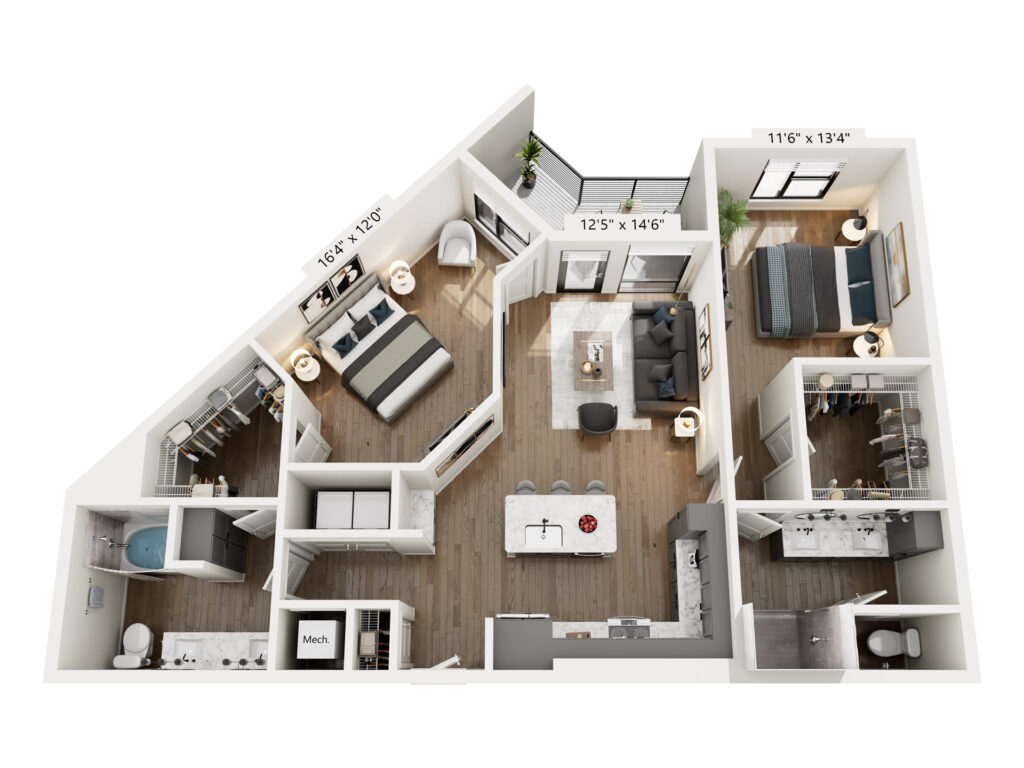
The Notion
Aesthetics & Organization for a Clutter-Free Mind
A tidy space promotes a tidy mind. Keep your desk organized with trays and drawer dividers for your supplies. Effective cable management is essential to eliminate visual clutter—use cable clips, sleeves, or boxes to keep wires hidden. For video calls, create a professional background with thoughtfully placed wall decor, a few plants, or a bookshelf.
For more inspiration, check out our creative decorating tips.
Beyond Your Apartment: Community Amenities That Work for You
Your workspace doesn’t have to end at your front door. The Galvin’s community amenities are designed to support your professional life.
- The Sphere: These private conference rooms are the perfect spot to take an important video call or host a small in-person meeting without any distractions.
- The Studio: Need a change of scenery to spark creativity? The private maker space includes co-working booths that offer a quiet, alternative workspace.
Plus, with a high-speed internet package available to residents and free guest Wi-Fi in all common areas, you’ll always have the reliable connection you need at The Galvin.
Tech and Tools for Peak Productivity
The right gear can make your workday feel seamless. These tech upgrades and simple hacks can transform your efficiency.
Essential Hardware Upgrades
- Monitors: Adding an external monitor (or two) is one of the biggest productivity boosts you can make. It reduces the need to constantly switch between tabs and makes comparing documents a breeze.
- Keyboard & Mouse: An external ergonomic keyboard and mouse offer more comfort and better wrist posture than a standard laptop trackpad and keyboard.
- Audio & Visual: A high-quality webcam and noise-canceling headphones are non-negotiable for remote work. They ensure you look and sound professional on every video call, no matter what’s happening around you.
Software and Productivity Hacks
Helpful software like a password manager can save you time, while a VPN can add a layer of security when you’re working. To structure your day and avoid feeling overwhelmed, try a simple productivity framework. For example, the 3-3-3 rule helps you prioritize your tasks by focusing on three main outcomes for the day, broken into smaller, manageable steps.
However, even the best productivity apps rely on a comfortable environment. Here is a quick breakdown of how to tailor your physical workspace based on the size of your home.
| Feature / Criteria | Efficient Setup (Studio / 1-Bedroom) | Dedicated Office (2 / 3-Bedroom) |
|---|---|---|
| Primary Workspace Location | A designated corner of the main living area or bedroom. | A separate, dedicated room with a closable door. |
| Key Advantage | Seamless integration of work and living space; encourages minimalism. | Separation of work and life; privacy for calls and deep focus. |
| Recommended Desk | Compact standing desk converter or a stylish, multi-use writing desk. | Full-size adjustable standing desk with ample surface area. |
| Recommended Tech | Laptop stand, wireless keyboard/mouse, all-in-one printer/scanner. | Dual-monitor setup with a monitor arm, high-quality webcam, and docking station. |
| Organization Strategy | Vertical shelving, wall-mounted organizers, under-desk storage. | Bookshelves, filing cabinets, and extensive cable management systems. |
FAQs: Your Work from Home Questions Answered
The best setup prioritizes ergonomics and your specific workflow. It includes an adjustable chair, a desk at the proper height, good lighting, and the tech you need to be efficient. The key is to create a space that is both comfortable and minimizes distractions.
Tax laws regarding home office deductions can be complex and depend on whether you are an employee or self-employed, as well as specific IRS requirements for regular and exclusive use. We always recommend consulting with a qualified tax professional to understand what you may be eligible to deduct.
The 3-3-3 rule is a time management technique to make your to-do list less overwhelming. It involves identifying 3 major outcomes you want to achieve for the day, breaking those down into 3 smaller tasks each, and then assigning 3 even smaller, actionable steps to get started.
The Galvin is equipped to handle the demands of remote work with a community-wide high-speed internet package available to residents, ensuring a reliable connection for video calls, file transfers, and all your professional needs. For specific details on speed and pricing, we encourage you to contact the leasing office directly.
Redefine Your Work Day at The Galvin
A great work-from-home setup is not an indulgence; it’s an essential part of a successful and balanced remote career. It’s achievable in any apartment with a little planning and the right resources. The Galvin isn’t just a place to live—it’s a community designed to support your modern, flexible lifestyle, offering both beautiful apartments to work in and professional-grade amenities to expand your options.
Ready to see where your perfect home office could be? Schedule a tour to experience The Galvin for yourself. Current residents, we encourage you to try these tips and rediscover your space!
